



Sweetsino Casino with Email Registration and Code Verification
Registration at Sweetsino Casino does not end when the site congratulates a new user on creating an account. After the message Congratulations, You Are Now Registered, a Verify Account window appears, asking for email confirmation. A code is sent to the address entered during sign-up, and access remains restricted until it has been verified. This makes it particularly important to use an inbox that is readily accessible: it will be needed both to complete the initial sign-in process and to recover a forgotten password later.
Creating an Account Through Register
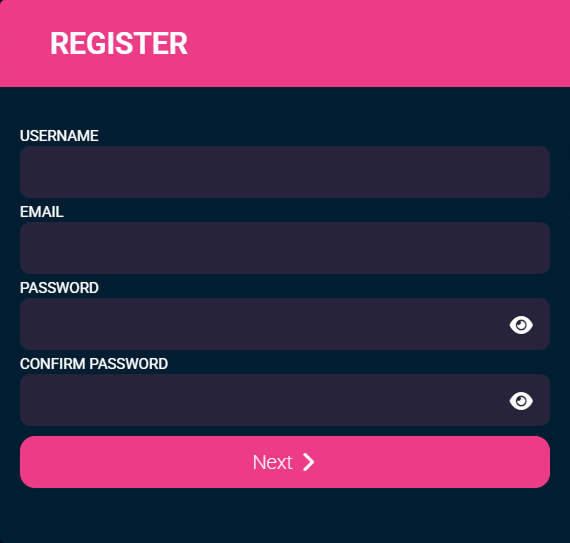
The registration form opens via the Register button. At the top of the window, three stages are displayed: Account Information, Additional Information and Confirm Information.
The first stage covers login credentials, with four fields to complete:
- Username — a name that serves as a separate account identifier.
- Email — a valid email address.
- Password — the password used to access the account.
- Confirm Password — a second entry to check that the password has been typed correctly.
The username and email address serve different purposes. The former identifies the user within the system, while the latter is used for service messages and password recovery.
When choosing a Username, it is sensible to avoid random combinations that are difficult to remember. The password, on the other hand, should be sufficiently strong and unique. Reusing the password for the associated email inbox is not recommended.
Once the fields are complete, the Next button moves the user to the following stage.
There are no separate sign-up options through Google, Facebook or other social networks. All details are entered directly into the site’s form.
Date of Birth and Mobile Number in Additional Information
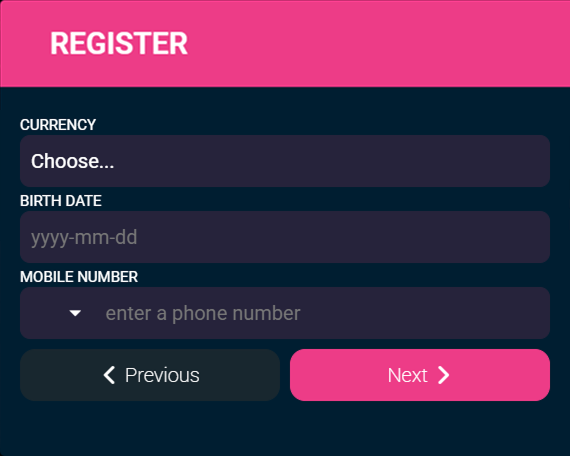
The next screen collects details needed for using the account. The operator asks for a date of birth, mobile number and account currency.
The Birth Date field requires the YYYY-MM-DD format, with the year first, followed by the month and day. This differs from the usual British date order, so players should follow the format shown in the form.
Mobile Number consists of an international dialling code and the telephone number itself. The country code is selected separately. For a British number, the corresponding international dialling prefix is required.
There are no fields for first name, surname or full residential address at this stage. Those details are absent from the registration form shown, although they may be requested later for identity verification.
If an error is spotted in information already entered, Previous allows the user to return to the earlier stage. It is easier to correct details before completing registration, particularly when the email address or date of birth is involved.
Choosing a Currency for a UK Account Holder
The Currency field appears alongside the date of birth, so the account’s denomination is selected before the cashier is used for the first time.
The available options are Canadian Dollar, Euro, Norwegian Krone, New Zealand Dollar, Polish Zloty and Dollar.
Pounds sterling are not among the available options.
For someone whose bank card is denominated in GBP, subsequent transactions may therefore involve currency conversion. If Euro is selected, for example, the transaction amount may be displayed in euros while the bank debits the equivalent in pounds.
The exchange rate and any additional charges depend on the bank or payment provider. An amount shown in euros should not be assumed to equal the same numerical amount in GBP.
It has not been confirmed whether users can change their account currency themselves after registration. Anyone who selects the wrong option would be better off contacting support before adding funds rather than trying to resolve the issue by creating a second account.
This is particularly relevant in the UK: an English-language interface and international payment services do not necessarily mean that the operator supports balances denominated in pounds sterling.
Accepting the Terms and Conditions
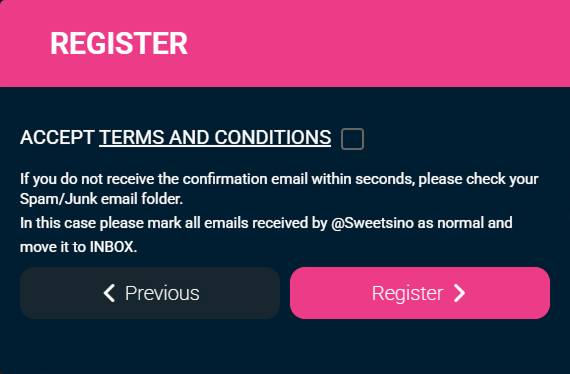
The final stage is called Confirm Information. Here, users can read the Terms and Conditions and confirm their acceptance.
Unlike the earlier stages, this screen does not require contact details to be entered again or a new password to be created.
Once the terms have been accepted and registration is completed, a message confirms that the account has been created successfully.
However, the congratulatory message does not mean that verification is complete. The site still requires email confirmation before granting further access.
This is a separate step, carried out after the form has been submitted.
Where to Enter the Verification Token
The operator uses a verification code rather than the more familiar method of activating an account through a link in an email.
After registration, a Verify Account window opens. It contains a field labelled Verification Token, where the code received by email must be entered.
The process is as follows:
- Complete registration and open the Verify Account window.
- Go to the email inbox specified during the first stage.
- Find the message containing the verification code.
- Enter the code in the Verification Token field.
- Click Verify Now.
Confirmation takes place directly on the website. Simply opening the email does not complete the process.
Once a valid code has been accepted, the user can proceed to the usual login process, provided there are no other access restrictions.
This step should not be confused with KYC. Email verification establishes control over the registered address; it does not confirm the account holder’s identity.
What to Do If the Verification Email Does Not Arrive
The Verify Account window includes instructions for users who have not received the message.
The first place to check is the Spam or Junk folder. Automated emails can occasionally be delayed or filtered out of the main inbox.
Anyone using several email accounts should also make sure they are checking the address entered during registration.
It is worth allowing a few minutes for delivery. A delay does not necessarily indicate an error in the submitted information or mean that account creation has failed.
If the message still does not arrive, the window directs users to support: Didn’t receive the code? Please contact support.
There is no separate option to resend the code on the screen shown. If the delay persists, the appropriate course is to use the contact method provided.
Registering again with a different address is not a suitable workaround. It could create complications with personal information and subsequent identity checks.
Logging In and Recovering a Forgotten Password
Once the email address has been verified, the user can sign in through Log In using the credentials created earlier.
The registered email address remains the main point of contact for account recovery. If the password is forgotten, the relevant option in the login form can be used to start the reset process.
An email containing further instructions is then sent to that address.
As social sign-in is not supported, a Google or Facebook account cannot replace the established login method.
If access to the email inbox has been lost, resetting the password independently may no longer be possible. In that situation, the account holder should contact live chat and follow the required identity checks.
On a shared computer, it is advisable not to save the password in the browser and to sign out after using the site.
The same login process applies on smartphones. There is no need to register separately for Android or iPhone.
When Identity Documents Are Required
Email confirmation is needed for account access, whereas identity verification is primarily associated with financial transactions.
Under the operator’s terms, KYC checks take place before the first withdrawal.
These generally involve a photographic identity document and proof of address. Additional information relating to the payment method used may also be requested.
It is particularly important that personal details match those of the bank account holder receiving the funds. Discrepancies may lead to further checks before a withdrawal request can be processed.
Documents should be submitted in accordance with the operator’s instructions. Blurred images, missing information or inconsistencies in personal details can result in another request for documentation.
Processing times depend on the completeness of the submitted material and the nature of the checks.
Being able to sign in after email confirmation does not mean that KYC has automatically been completed. The two procedures serve different purposes and are handled separately.
Responsible Gambling Settings
The account area includes tools for restricting gambling activity.
Users can set limits on deposits, stakes, losses and session length. These settings allow spending and time boundaries to be established in advance rather than relying solely on the current balance.
For a temporary break, the operator provides a 24-hour time-out. Self-exclusion is also listed, with periods starting at six months and longer options available.
Additional controls include restrictions on certain categories and reminders of time spent during a session.
Self-exclusion has more significant consequences than simply logging out. Access is restricted for the selected period, and changes to those restrictions are governed by the applicable rules.
UK players should also consider the operator’s regulatory status. The ability to complete a registration form does not establish that the operator holds a UK Gambling Commission licence. The available information identifies an Anjouan licence, so authorisation to serve consumers in Great Britain needs to be checked separately.
The main page provides further information about the site, its catalogue, promotions and payment facilities.